Order Automation: Click to Doorstep

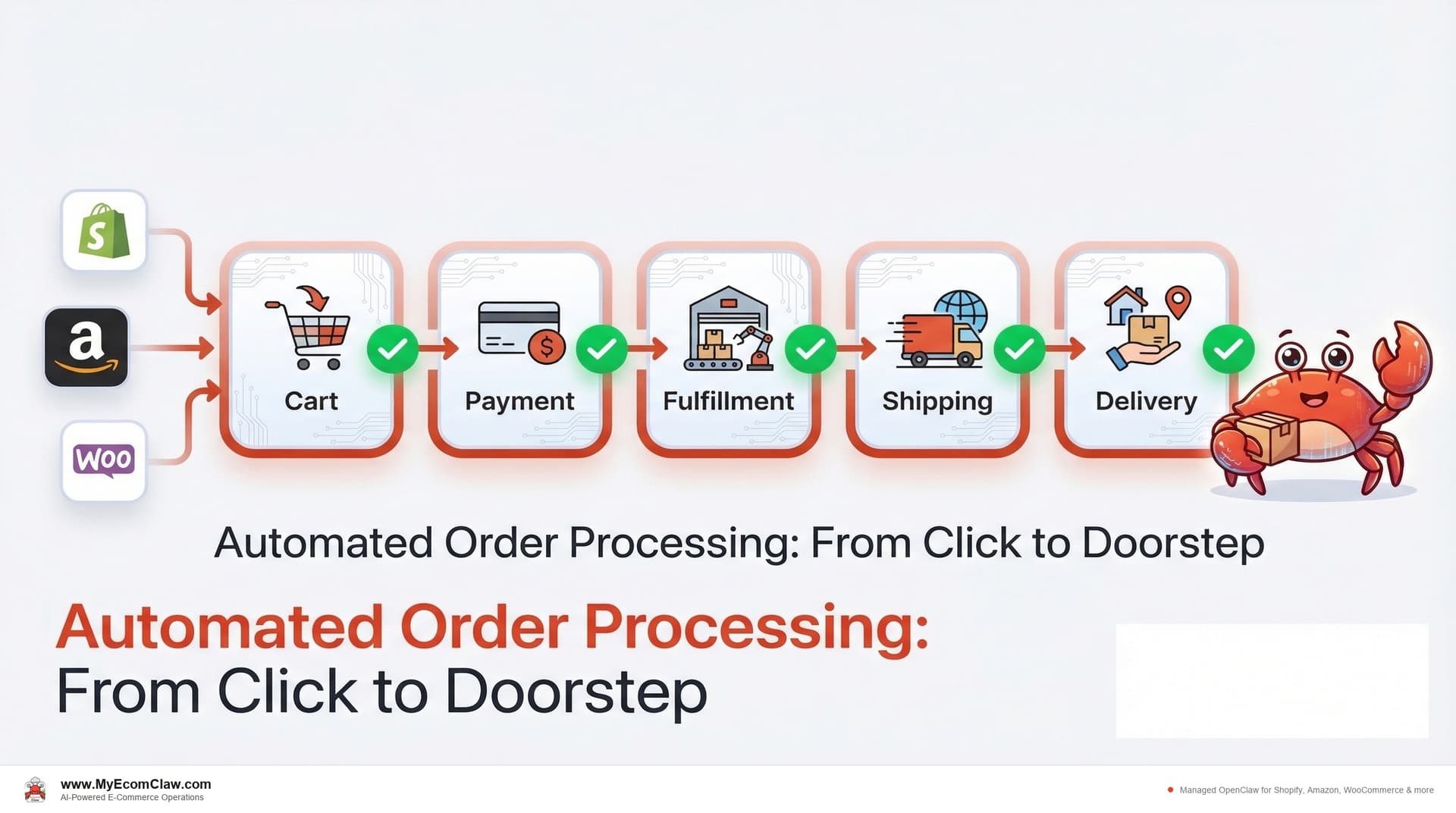
A customer clicks "Buy Now" on your Shopify store at 11:47 PM. What happens next? If you’re like most sellers, the answer is: nothing — until you wake up, open your laptop, verify the payment, check inventory, create a shipping label, update the order status, and send a confirmation email. That’s 6-8 minutes per order. Multiply by 50 orders a day and you’ve spent your entire morning on something that should have happened while you slept.
Now multiply that across Shopify, Amazon, and WooCommerce. Three platforms. Three dashboards. Three sets of order notifications. Three different fulfillment workflows.
And the customer? They expected a confirmation email within 5 minutes. They got it 12 hours later. Your competitor sends theirs in 30 seconds.
The order processing bottleneck nobody talks about
On r/shopify, a seller posted: "I’m spending 3 hours every morning just processing yesterday’s orders. By the time I’m done, today’s orders are piling up." Another wrote: "We had a 40% increase in orders during Black Friday. Our order processing completely fell apart. We shipped 15 orders to the wrong addresses."
A Shopify Flow survey found that 43% of merchants still process orders manually — clicking through admin, copying addresses, printing labels one at a time. Even sellers using partial automation report spending 1-2 hours per day on order-related tasks.
Here’s what order processing actually involves for a multi-channel seller:
- Payment validation (fraud check, address verification, card authorization)
- Inventory confirmation (is the item actually in stock across all channels?)
- Fulfillment routing (which warehouse? Which carrier? Domestic or international?)
- Shipping label generation (rate comparison, label creation, tracking number)
- Customer notification (confirmation email, shipping update, tracking link)
- Status updates (mark as fulfilled on Shopify, update Amazon, sync WooCommerce)
- Exception handling (address issues, payment holds, partial stock, backorders)
- Returns processing (RMA generation, return label, refund, restocking)
That’s 8 discrete steps per order. At 100 orders/day, that’s 800 micro-tasks. Every single day.
Most sellers automate 2-3 of these steps and do the rest manually. The gaps between automated steps are where mistakes happen — wrong addresses, missed fraud flags, oversold items, delayed notifications.
What the Order Agent actually does (step by step)
OpenClaw’s Order Agent handles the entire lifecycle of an order — from the moment a customer clicks "Buy" to the moment the package arrives at their doorstep. Here’s the exact flow:
Step 1: Payment validation
When a new order comes in via the Shopify Admin API, Amazon SP-API, or WooCommerce REST API, the Order Agent immediately:
- Verifies payment authorization status
- Checks for common fraud signals (mismatched billing/shipping, high-risk countries, velocity patterns)
- Validates the shipping address against postal databases
- Flags orders that need manual review (high value, new customer + rush shipping, known fraud patterns)
What you see: A WhatsApp message if anything needs your attention. Otherwise, the order flows through automatically.
Step 2: Inventory confirmation
The Order Agent checks with the Inventory Agent in real-time:
- Is the item in stock at the fulfillment location?
- If multi-warehouse, which location has stock closest to the customer?
- If a bundle, are all component items available?
- If stock is low, should this order be held for manual review?
What you see: Nothing — unless there’s a stock issue. If there is, you get a WhatsApp alert with options: fulfill from alternate location, backorder, or contact the customer.
Step 3: Fulfillment routing
Based on inventory location, shipping address, and carrier rates, the Order Agent routes the order:
- Single-warehouse: direct fulfillment
- Multi-warehouse: split shipment or route to nearest location
- Dropship: forward order to supplier via API or email
- FBA: route to Amazon fulfillment if seller uses FBA for multi-channel
- International: apply correct customs documentation and carrier selection
Step 4: Shipping label generation
The Order Agent compares carrier rates, selects the optimal option based on your rules (cheapest, fastest, or best value), and generates the shipping label. Tracking number is captured automatically.
Step 5: Customer notification
Confirmation email, shipping notification with tracking link, and delivery estimate — all sent automatically. Templates are customizable. The Support Agent monitors for any customer responses.
Step 6: Status sync across channels
Order status updates across all connected platforms simultaneously. Shopify shows "Fulfilled." Amazon shows "Shipped." WooCommerce shows "Completed." One order, one update, all channels in sync.
Talk to your agent on WhatsApp — order management in real-time
Here’s what order processing looks like when your OpenClaw Order Agent is running. You don’t open dashboards. You open WhatsApp.
Morning order review:
How were overnight orders?
Good morning! Overnight order summary:
📦 67 orders processed across 3 channels
– Shopify: 38 orders — all fulfilled, labels generated
– Amazon: 21 orders — 19 fulfilled, 2 routed to FBA
– WooCommerce: 8 orders — all fulfilled
✅ 0 payment issues. All transactions verified.
✅ 0 address errors. All addresses validated.
✅ 0 oversells. Inventory Agent confirmed stock for every item.
⚠️ 1 flag: Order #9247 — $487 purchase from new customer, rush shipping to a different state than billing address. Fraud risk: medium. Held for your review.
Show me order #9247 details.
Order #9247:
– Customer: John D. (first order, no history)
– Items: 3x Premium Headphones ($162 each)
– Billing: 123 Main St, Austin TX
– Shipping: 456 Oak Ave, Miami FL
– Payment: Visa ending 4821, authorized
– Fraud indicators: billing/shipping mismatch, high value, first order
Recommend: Verify with customer before shipping. Shall I send a verification email?
Yes, send the verification email. Hold the order until they confirm.
✅ Verification email sent. Order held. I’ll notify you when they respond.
Mid-day exception handling:
Approve the upgrades for the 3 urgent orders. Nice catch.
✅ 3 orders upgraded to UPS Next Day. Customers notified with new delivery estimates. Total cost: $55.50.
That carrier delay would have generated 12 angry "where is my order" emails. Your agent caught it, notified customers proactively, and gave you a one-tap solution for the urgent ones. Total time: 30 seconds on WhatsApp.
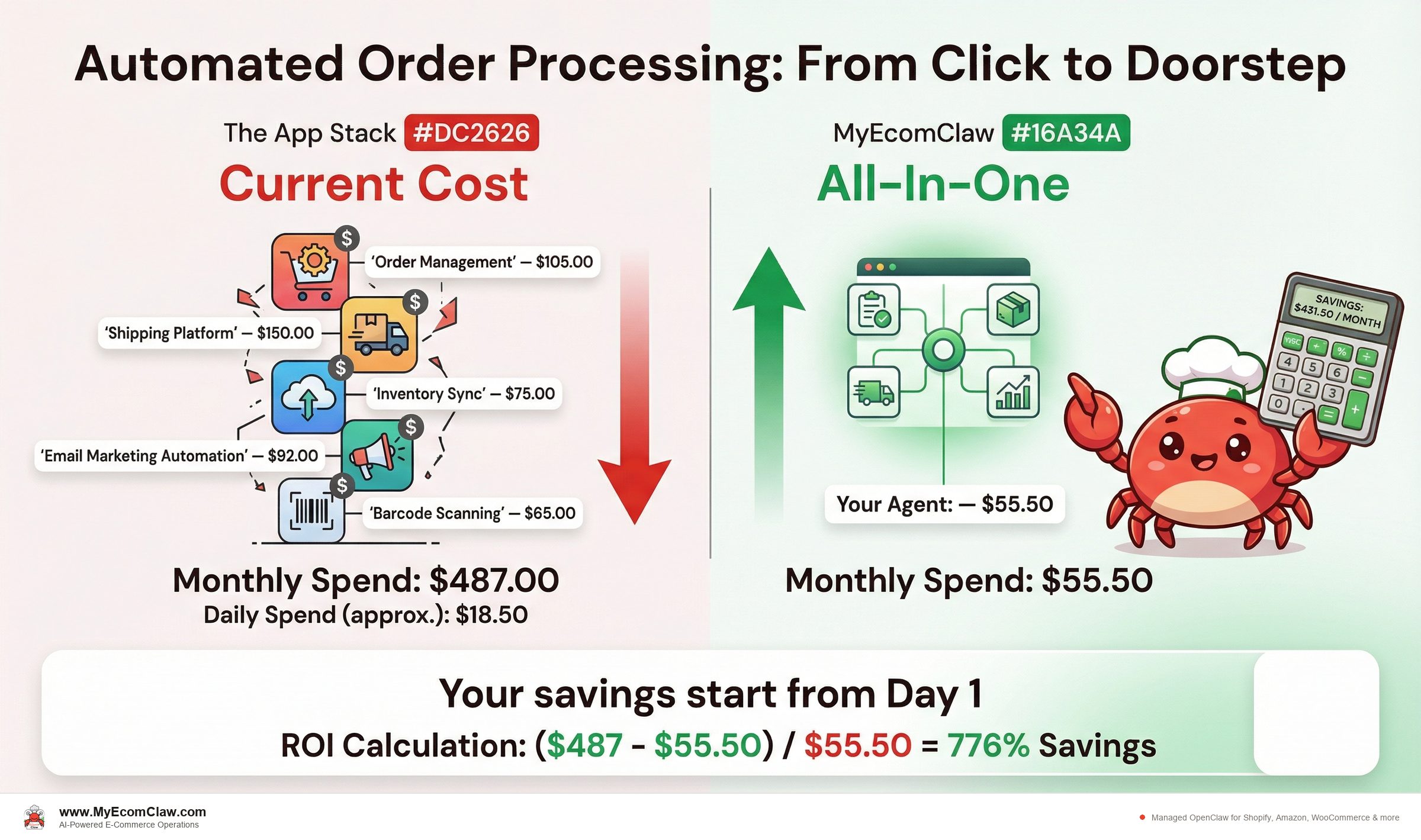
Before and after: a typical order processing day
Before: Wednesday with manual order processing
| Time | Task | Duration |
|---|---|---|
| 7:00 AM | Open Shopify admin — 42 new orders overnight | 5 min |
| 7:05 AM | Open Amazon Seller Central — 28 new orders | 5 min |
| 7:10 AM | Open WooCommerce — 11 new orders | 5 min |
| 7:15 AM | Review orders for fraud flags (manually check billing/shipping mismatches) | 20 min |
| 7:35 AM | Check inventory levels for all ordered items across platforms | 15 min |
| 7:50 AM | Discover 3 items are oversold on Amazon — start refund process | 20 min |
| 8:10 AM | Generate shipping labels — batch in ShipStation, fix 5 address errors | 30 min |
| 8:40 AM | Send confirmation emails for orders that didn’t auto-trigger | 10 min |
| 8:50 AM | Update order statuses on Amazon and WooCommerce manually | 15 min |
| 9:05 AM | Handle 6 “where is my order” support tickets from yesterday’s shipments | 25 min |
| 9:30 AM | Process 2 return requests — create RMAs, send labels, initiate refunds | 20 min |
| 9:50 AM | Finally start working on today’s actual priorities | — |
| Total | Manual order processing | 2 hours 50 minutes |
After: Wednesday with the OpenClaw Order Agent
| Time | What Happens | Your Involvement |
|---|---|---|
| Overnight | 81 orders processed automatically across 3 channels | 0 min |
| 7:00 AM | WhatsApp summary: “81 orders processed. 0 issues. 1 fraud flag held for review.” | 30 sec reading |
| 7:01 AM | You review the flagged order, approve verification email | 1 min |
| 7:02 AM | Check the 2 escalated support tickets (complex refund requests) | 5 min |
| 7:07 AM | Start working on today’s actual priorities | — |
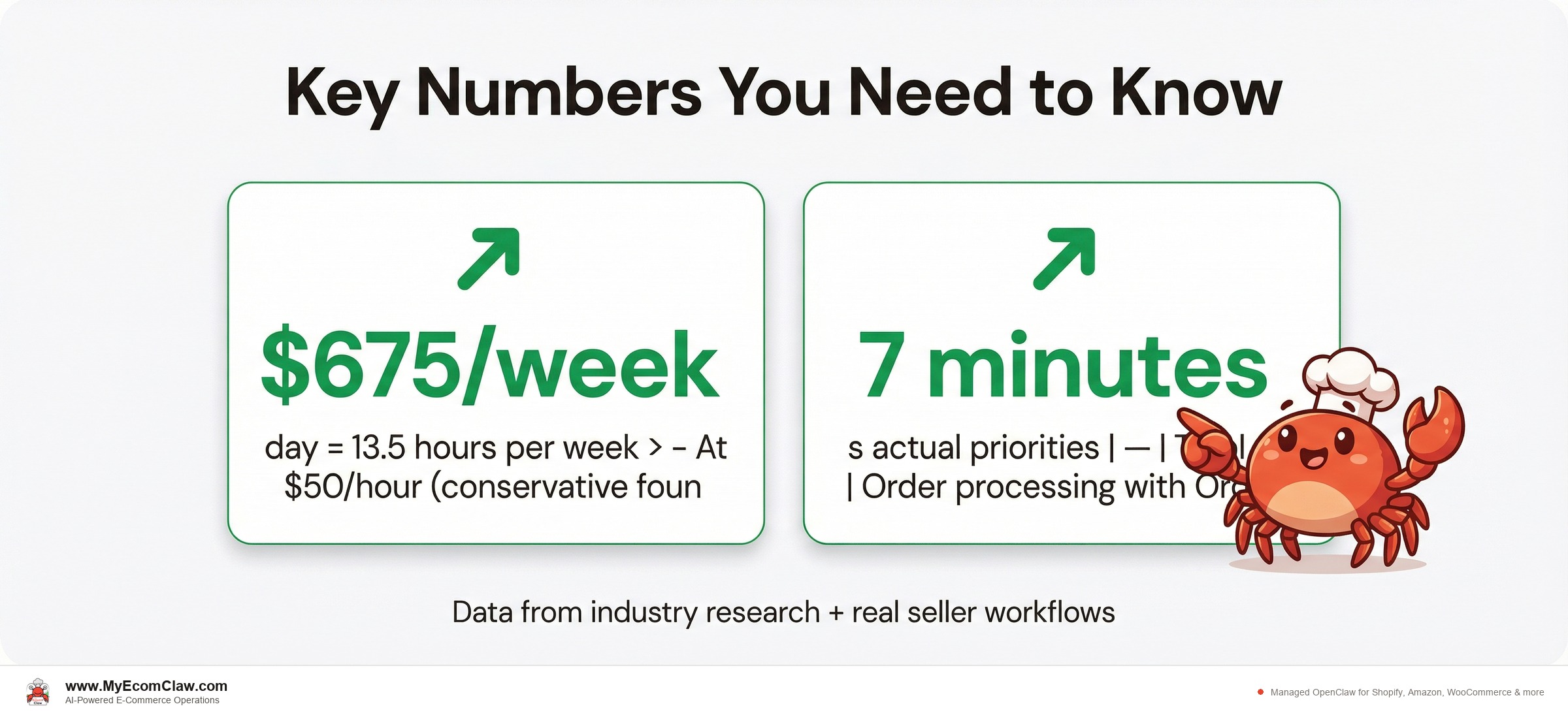
| Total | Order processing with Order Agent | 7 minutes |
- Time saved:2 hours 43 minutes per day = 13.5 hours per week
- At $50/hour(conservative founder rate) = $675/week
- Annual value of recovered time: $35,100/year
- Oversells prevented:Every single one. Real-time inventory check before fulfillment.
- Customer satisfaction:Confirmation emails in seconds, not hours.
That’s $35,100 in recovered time per year — plus the revenue saved from prevented oversells, faster customer notifications, and proactive exception handling. The Growth plan costs $599/month. The ROI isn’t a question.
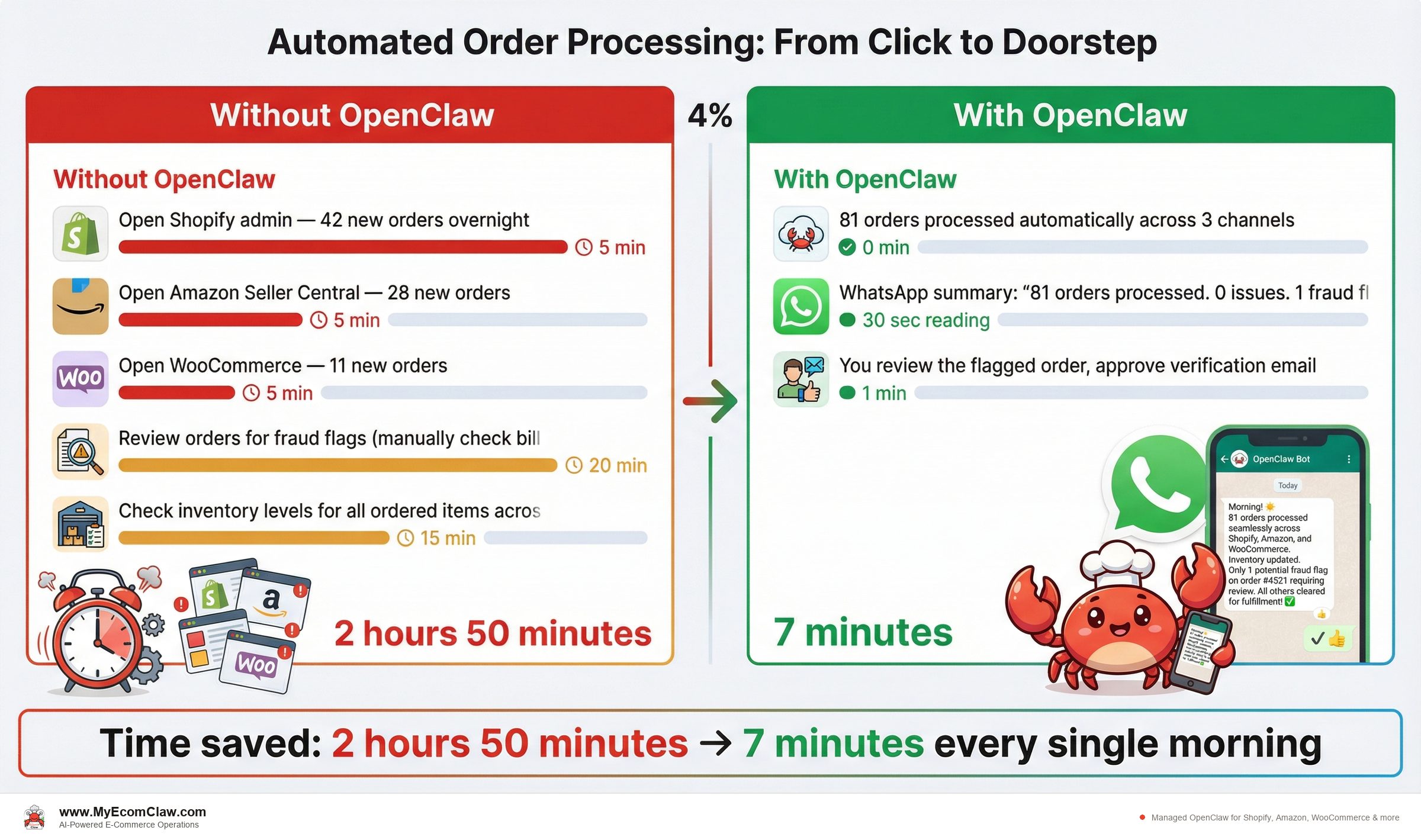
Multi-channel order management: the coordination problem
The real complexity isn’t processing orders on one platform. It’s coordinating across multiple platforms simultaneously. Here’s where multi-channel sellers lose time and money:
| Challenge | What Goes Wrong | How the Order Agent Handles It |
|---|---|---|
| Inventory double-counting | Customer orders on Shopify and Amazon within 5 minutes — both see "1 in stock" | Real-time inventory lock. First order claims the unit. Second order is flagged before fulfillment. |
| Inconsistent order statuses | Fulfilled on Shopify but still shows "Processing" on WooCommerce | Status sync across all channels simultaneously via API |
| Different fulfillment rules | Amazon requires specific packaging. Shopify orders go through your 3PL. WooCommerce has free shipping thresholds. | Channel-specific fulfillment rules configured per platform |
| Split shipments | Customer orders 3 items. 2 are in warehouse A, 1 is in warehouse B. | Order Agent creates 2 shipments, generates 2 labels, sends unified tracking notification |
| International orders | Different customs forms, duties, restricted items per country | Auto-generates customs documentation, flags restricted items, selects appropriate carrier |
| Returns across channels | Customer bought on Amazon, wants to return through your website | Order Agent tracks original channel, applies correct return policy, routes accordingly |
How the Orchestration Agent adds another layer:
When the Order Agent encounters a complex scenario — like a high-value international order from a new customer on a product that’s low in stock — the Orchestration Agent coordinates:
Order Agent: Holds the order for review
Inventory Agent: Confirms stock and flags if reorder is needed
Support Agent: Prepares a personalized confirmation with customs timeline
Marketing Agent: Checks if this customer came through a paid campaign (to prioritize the experience)
No combination of Shopify apps does this. Your shipping app doesn’t know about your inventory levels. Your support app doesn’t see your order pipeline. Your marketing app doesn’t know which customers are mid-purchase. Only a coordinated agent team connects these dots.
Built on OpenClaw — 191K+ GitHub stars, MIT licensed, the most popular open-source AI agent in the world. Deployed by Space-O Technologies — 15+ years, 80+ AI developers, 500+ projects delivered. Your server. Your data. No lock-in.
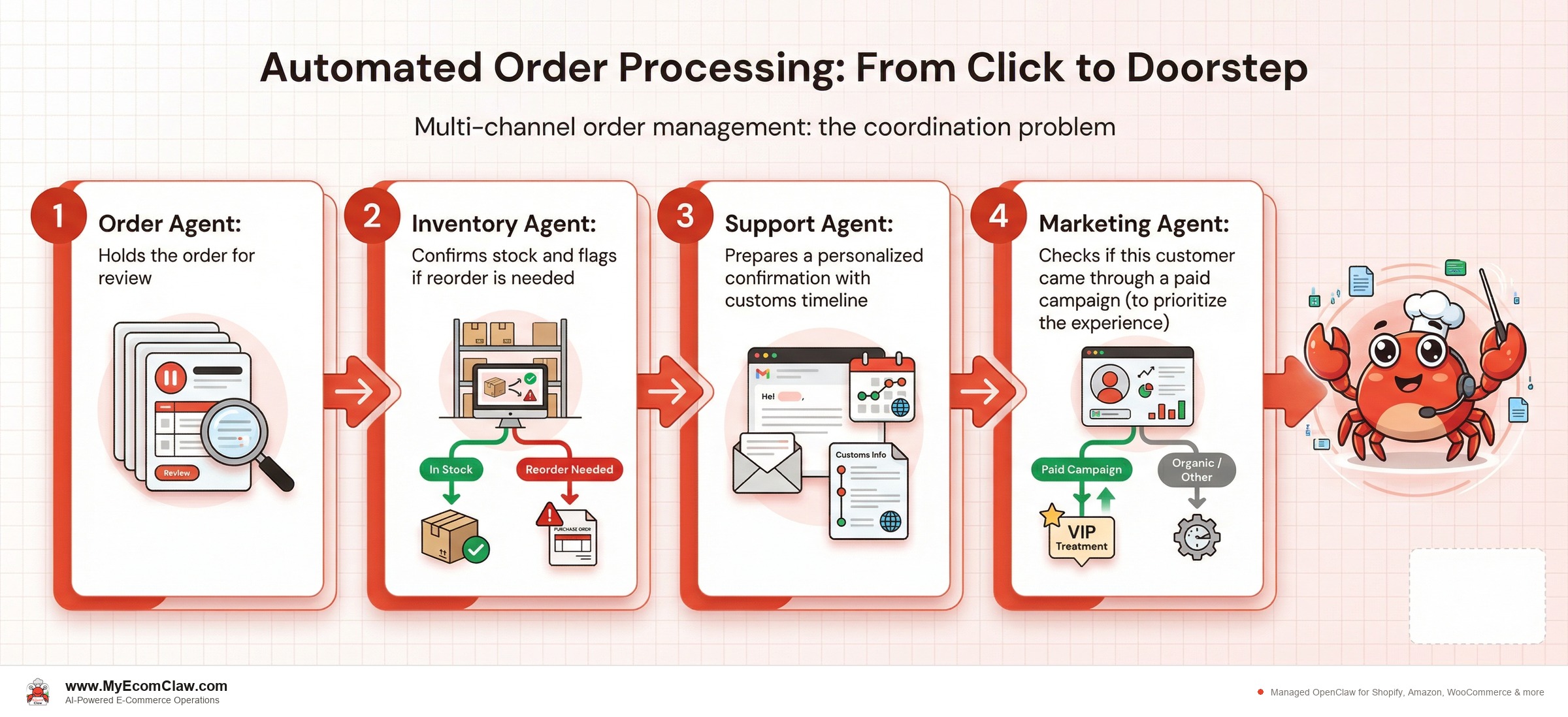
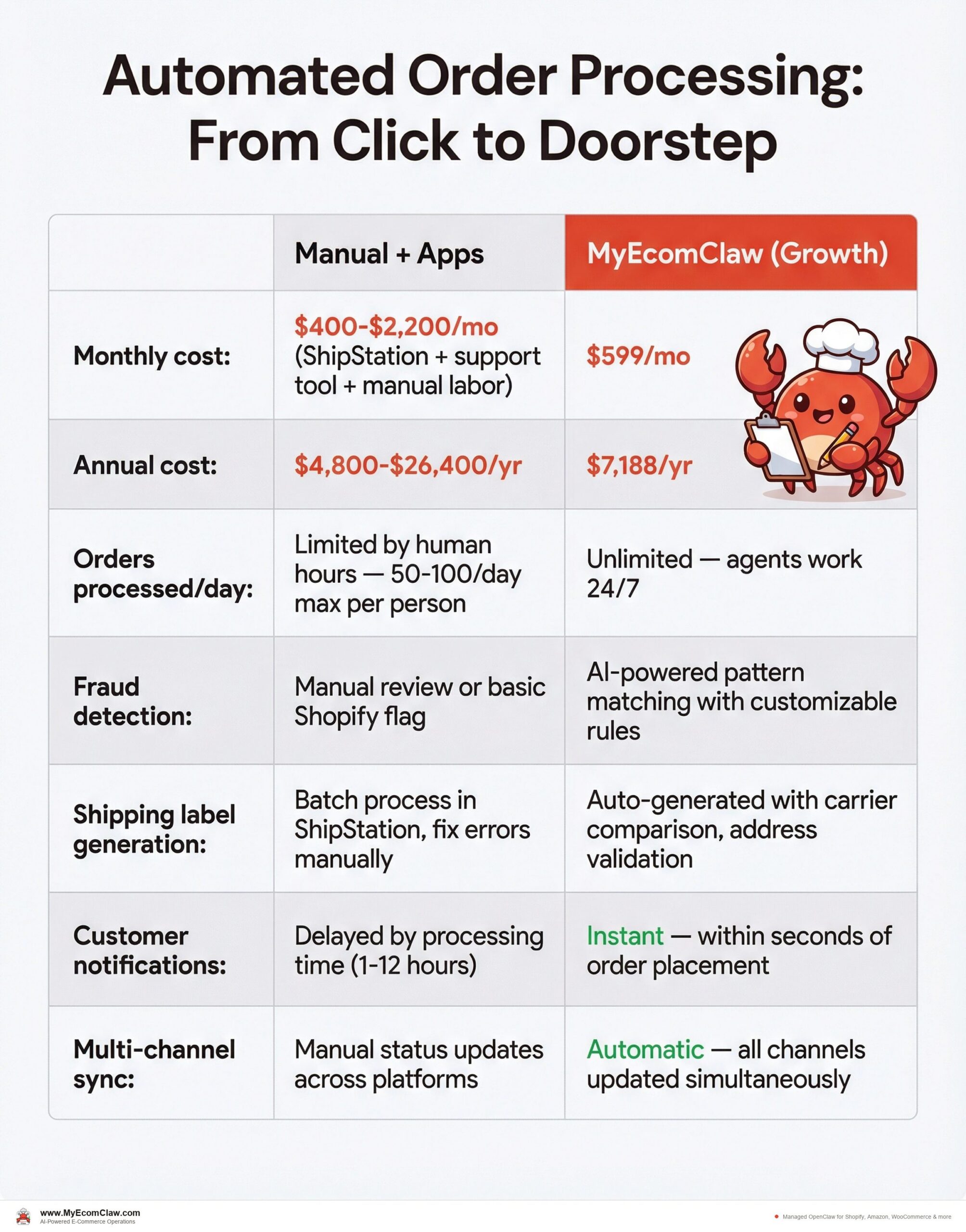
The cost math: manual processing vs. Order Agent
Let’s break down the real cost of order processing at different volumes:
| Manual + Apps | MyEcomClaw (Growth) | |
|---|---|---|
| Monthly cost | $400-$2,200/mo (ShipStation + support tool + manual labor) | $599/mo |
| Annual cost | $4,800-$26,400/yr | $7,188/yr |
| Orders processed/day | Limited by human hours — 50-100/day max per person | Unlimited — agents work 24/7 |
| Fraud detection | Manual review or basic Shopify flag | AI-powered pattern matching with customizable rules |
| Shipping label generation | Batch process in ShipStation, fix errors manually | Auto-generated with carrier comparison, address validation |
| Customer notifications | Delayed by processing time (1-12 hours) | Instant — within seconds of order placement |
| Multi-channel sync | Manual status updates across platforms | Automatic — all channels updated simultaneously |
| Exception handling | You discover problems when customers complain | Agent flags issues before they become problems |
| Returns processing | Manual RMA creation, label generation, refund | Automated with one-tap approval from WhatsApp |
| Error rate | 2-5% (wrong address, wrong item, missed fraud) | <0.5% with automated validation |
| Data ownership | Spread across 3-4 vendor clouds | Your server. Your data. Full SSH access. |
At 3,000 orders/month: Manual processing costs roughly $5,000-$8,000/month when you factor in labor, tools, and error-related losses. The Growth plan is $599/month. That’s a 90% cost reduction.
Fulfillment routing: how the Order Agent picks the best path
Not every order follows the same path. The Order Agent evaluates each order and routes it through the optimal fulfillment method:
Routing decision tree:
Is the item in stock at the customer’s nearest warehouse?
- Yes → Fulfill from that warehouse. Generate label with nearest carrier.
- No → Check alternate warehouses.
Is the item available at another warehouse?
- Yes → Calculate shipping cost difference. If <$5, ship from alternate. If >$5, check if split shipment makes sense.
- No → Check if dropship is available.
Is this an FBA-eligible order?
- Yes (Amazon order or Multi-Channel Fulfillment enabled) → Route to Amazon FBA.
- No → Continue to 3PL or in-house fulfillment.
Is this an international order?
- Yes → Apply customs rules, select international carrier, generate documentation.
- No → Standard domestic routing.
Does the customer have special shipping requirements?
- Rush/overnight → Prioritize speed over cost.
- Free shipping eligible → Route through cheapest carrier meeting SLA.
- Signature required → Flag for carrier selection.
The Order Agent evaluates this decision tree in milliseconds for every order. A human doing the same evaluation takes 3-5 minutes per complex order.
At 100 orders/day, that’s 5-8 hours of routing decisions. Your agent does it in the time it takes you to sip your coffee.
Returns and refunds: the hidden order processing cost
Returns are where most order processing workflows break down completely. The average e-commerce return rate is 20-30% (higher in fashion), and each return involves:
- Customer initiates return (email, support ticket, or portal)
- RMA number generated
- Return shipping label created
- Return received and inspected
- Refund or exchange processed
- Inventory updated (restocked or written off)
- Customer notified at each step
How the Order Agent + Support Agent handle returns:
| Step | Manual Process | With OpenClaw Agents |
|---|---|---|
| Customer requests return | You read the email, check the return policy, decide | Support Agent checks policy, auto-approves if within window |
| RMA generation | You create an RMA in your system | Order Agent generates RMA automatically |
| Return label | You generate and email a label | Label auto-generated, emailed with tracking |
| Return tracking | Customer asks "where’s my refund?" — you check tracking | Support Agent proactively updates customer as return moves |
| Refund processing | You verify return, process refund manually | Order Agent auto-processes refund on receipt confirmation |
| Inventory restock | You manually add returned item back to inventory | Inventory Agent updates stock across all channels |
| Customer follow-up | Maybe you send a follow-up email. Maybe not. | Marketing Agent sends a retention offer automatically |
A single return takes 10-15 minutes of manual work. At a 25% return rate on 100 orders/day, that’s 250-375 minutes per day — over 6 hours — just on returns. Your agents handle it in the background while you focus on growth.
Common order processing mistakes (and how the Order Agent prevents each one)
| Mistake | Why It Happens | How the Order Agent Prevents It |
|---|---|---|
| Shipping to wrong address | Copy-paste errors, auto-fill glitches | Address validation against postal databases before label generation |
| Missing fraud | Manual review skips patterns humans can’t see | AI pattern matching — billing/shipping mismatch, velocity, device fingerprint |
| Delayed notifications | Processing backlog means confirmations go out hours late | Instant notifications triggered the moment order is validated |
| Overselling | Inventory not checked at time of fulfillment | Real-time inventory lock with Inventory Agent before any fulfillment |
| Wrong carrier selection | Defaulting to one carrier without comparing rates | Automatic rate comparison across configured carriers for every order |
| Return policy violations | Approving returns outside the return window | Policy rules enforced automatically — window, condition, exclusions |
Why this matters for your business
Order processing isn’t just an operational task. It’s the customer experience. Every minute of delay between "Buy Now" and "Your order is confirmed" erodes trust. Every wrong shipment costs you a customer. Every manual step is an opportunity for error.
The sellers who grow fastest aren’t the ones with the best products — they’re the ones whose operations are invisible to the customer. The order confirmation arrives in seconds. The tracking link appears within hours. The return is processed without friction. The customer never sees the complexity behind the curtain.
Your Order Agent makes that complexity disappear. Not by simplifying it, but by handling all of it — payment validation, fraud detection, inventory confirmation, fulfillment routing, label generation, customer notification, returns processing — automatically, 24/7, across every channel.
Our take
Order processing is the operational heartbeat of your store. Get it right and everything flows — fast confirmations, accurate fulfillment, happy customers, clean books. Get it wrong and you’re drowning in support tickets, refund requests, and negative reviews.
The manual approach works until about 50 orders/day. Then it breaks. The app-stack approach works until about 200 orders/day. Then the coordination gaps between apps create the same problems you were trying to solve.
OpenClaw’s Order Agent doesn’t just automate individual steps. It owns the entire order lifecycle — from payment validation to doorstep delivery — and coordinates with the other four agents at every stage. When inventory is low, the Order Agent knows. When a carrier is delayed, the Support Agent knows. When a return comes in, the Marketing Agent sends a retention offer. That’s not automation. That’s orchestration. And it runs on your server, not ours.
If you’re spending more than 30 minutes a day on order processing, your Order Agent will pay for itself in the first week. See plans → · Talk to us first →
FAQ
How does the Order Agent handle payment fraud?
The Order Agent uses AI pattern matching to detect fraud signals: billing/shipping address mismatches, unusual order velocity, high-value first-time purchases, and known fraud patterns. Suspicious orders are held and you’re notified on WhatsApp with a summary and recommendation. You approve or cancel with a single message. False positive rate is significantly lower than manual review because the agent sees patterns across all your orders, not just individual transactions.
Can the Order Agent work with my existing shipping provider?
Yes. The Order Agent integrates with major carriers through Shopify’s shipping APIs and direct carrier integrations. Whether you use UPS, USPS, FedEx, DHL, or regional carriers, the agent compares rates and generates labels through your existing accounts. You keep your negotiated carrier rates.
What happens during a flash sale or volume spike?
The Order Agent scales automatically. Unlike a human team that gets overwhelmed at 3x normal volume, the agent processes orders at the same speed whether you have 50 or 5,000 in the queue. During spikes, the Inventory Agent monitors stock in real-time to prevent overselling, and the Support Agent handles the increased inquiry volume. See how our plans handle different volumes →.
Does the Order Agent handle subscription orders?
Yes. Recurring orders are processed on schedule with the same validation, inventory check, and fulfillment routing as one-time orders. The agent tracks subscription status, handles payment retries for failed charges, and coordinates with the Support Agent for subscription-related inquiries.
How are multi-warehouse orders handled?
When an order contains items from different warehouse locations, the Order Agent evaluates options: ship from the warehouse with the most items (fewer shipments, higher per-item cost), split into multiple shipments from nearest warehouses (faster delivery, more labels), or route entirely to one location if stock allows. Your routing preferences are configurable. Talk to us about your multi-warehouse setup →.
Can I override the agent’s decisions?
Absolutely. The Order Agent follows your configured rules but you can override any decision from WhatsApp. Hold an order, change the carrier, approve or cancel a flagged transaction, modify a return — all with a message. The agent learns from your overrides to improve future decisions.
What about orders from Amazon FBA?
If you use Fulfilled by Amazon for some or all of your orders, the Order Agent routes eligible orders to FBA automatically. For multi-channel fulfillment (using FBA to fulfill Shopify or WooCommerce orders), the agent evaluates whether FBA or your own fulfillment is more cost-effective per order. Amazon-specific requirements (packaging, labeling, prep) are handled according to your FBA configuration.
Ready to automate every order from click to doorstep?
MyEcomClaw deploys OpenClaw on your own server with an Order Agent that handles payment validation, fulfillment routing, shipping labels, and returns — across Shopify, Amazon, and WooCommerce. 24/7. Managed.
More from Automation
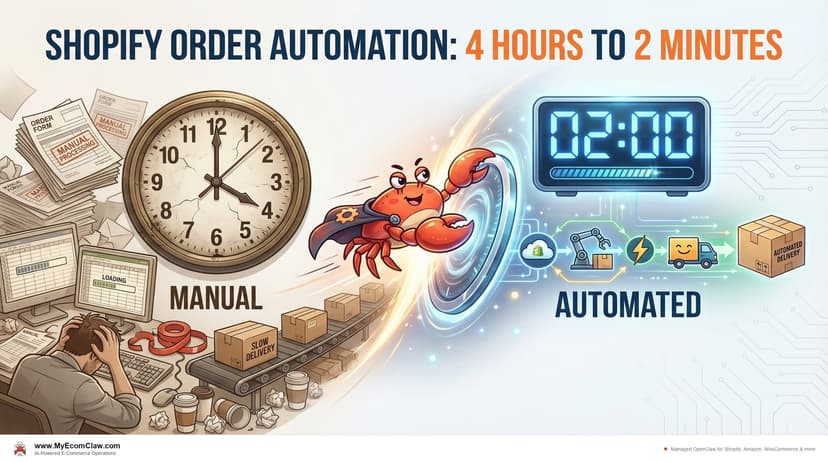
Shopify Order Automation: 4 Hrs to 2 Min
Shopify sellers spend 4-5 hours daily on manual order processing. Here’s a step-by-step breakdown of what OpenClaw’s Order Agent automates —.
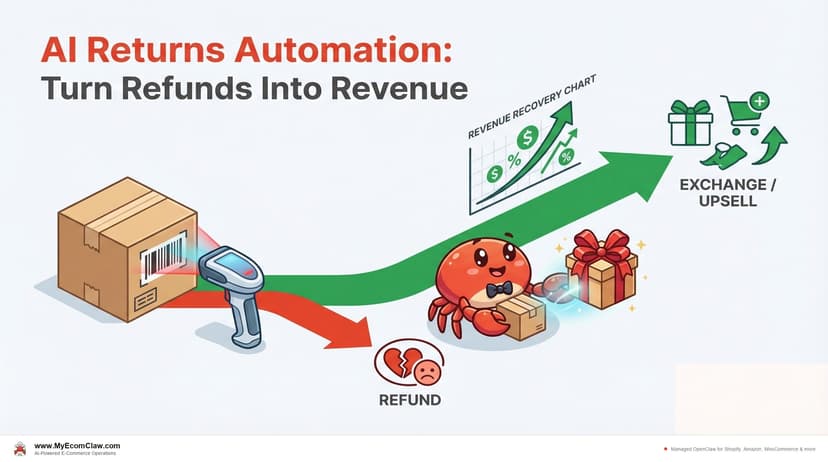
AI Returns: Turn Refunds Into Revenue
The average e-commerce return rate is 20-30%. Most sellers treat returns as pure cost. OpenClaw’s Support + Order agents automate approvals,.
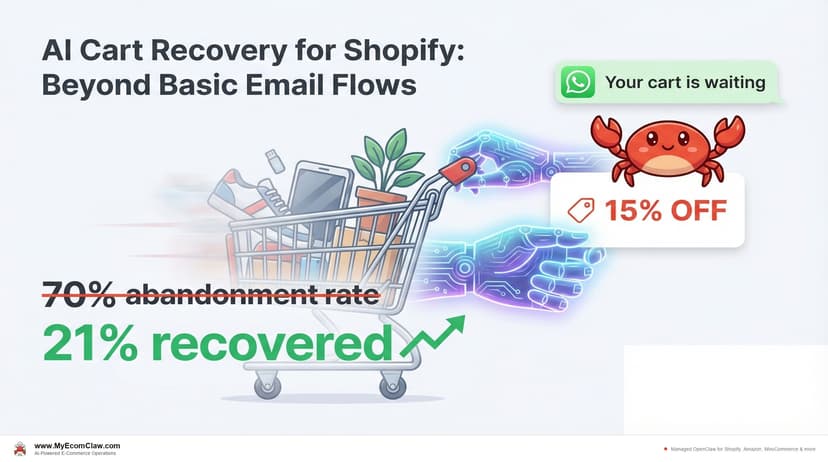
AI Cart Recovery for Shopify Stores
70% of Shopify carts are abandoned. Klaviyo sends three emails. OpenClaw’s Marketing Agent sends AI-timed emails, generates one-time discount codes.